.png)
What Is An IOSS Number?
IOSS, which stands for Import-One-Stop-Shop, is is the electronic portal businesses can use since 1 July 2021 to comply with their VAT e-commerce obligations on distance sales of imported goods.
- The IOSS facilitates the process of collecting, declaring, and paying of VAT from sellers outside of the EU that are making sales of goods to buyers in the EU
- The IOSS also makes the process more convenient for the buyer, who is only charged at the time of purchase. Therefore, your customers avoid any surprise fees when the goods are delivered
- If the seller is not registered in the IOSS, the buyer has to pay the VAT and usually a customs clearance fee charged by the transporter at the moment the goods are imported into the EU.
So if you are sending into the EU via your own website or an IOSS registered marketplace for goods up to 150EUR, then you qualify for IOSS. The "no VAT applied to shipments valued under €22" no longer exists.
For more information on IOSS, please click here
IOSS Number:
If you qualify, then you're able to register your business for the IOSS. Upon being successful, you will receive a unique 12 digit, alphanumeric code which you use to facilitate VAT e-commerce transactions for that specific electronic interface. You can store the relevant IOSS numbers in the settings area of Nexae:
Step 1) In 'Settings', under 'Customs Info', you'll find a section on IOSS Numbers.

Step 2) Click 'Add Another' and a pop up will appear. Here, enter your 12 digit IOSS code and select 'Save'.
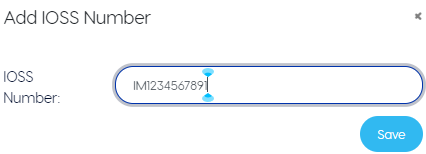
Step 3) If you want to remove or edit an IOSS number at any point, you can do so by selecting he icons to the right.

Manual Shipments With IOSS
When making a manual upload to Nexae, depending on the delivery stream selected, IOSS entry may or may not be restricted. If you have selected a delivery stream that requires an IOSS number then you will be able to choose from the drop down menu.

Please note, the only IOSS numbers that will be displayed in the drop down will be those listed in your 'Customs Info' in 'Settings'
Bulk Upload With IOSS
When making a bulk upload with a CSV. file, it's important that you input the correct IOSS number for each shipment. The IOSS number you enter must also be listed in your 'Customs Info' in 'Settings' before you upload the file to Nexae.